Day 84: Teaching Your Logs to Speak Human - Natural Language Processing for Log Understanding
Day 84: Teaching Your Logs to Speak Human - Natural Language Processing for Log Understanding
What We're Building Today
Today we're adding intelligence to your log processing system by teaching it to understand human language. Instead of treating log messages as meaningless strings, we'll build an NLP engine that extracts real meaning from your logs.
High-Level Learning Agenda:
By the end of today, your system will:
The Human Language Problem in Logs
Real-world logs are messy. Your database might log "Connection timeout after 30s retry to 192.168.1.100", while your web server says "User authentication failed for admin@company.com". Traditional regex-based parsing breaks down when dealing with dynamic, human-written log messages.
Netflix processes over 1 billion log events daily, many containing natural language descriptions of system states. Their NLP pipeline automatically categorizes incidents, extracts relevant entities, and routes alerts to appropriate teams—all based on understanding the semantic meaning of log text.
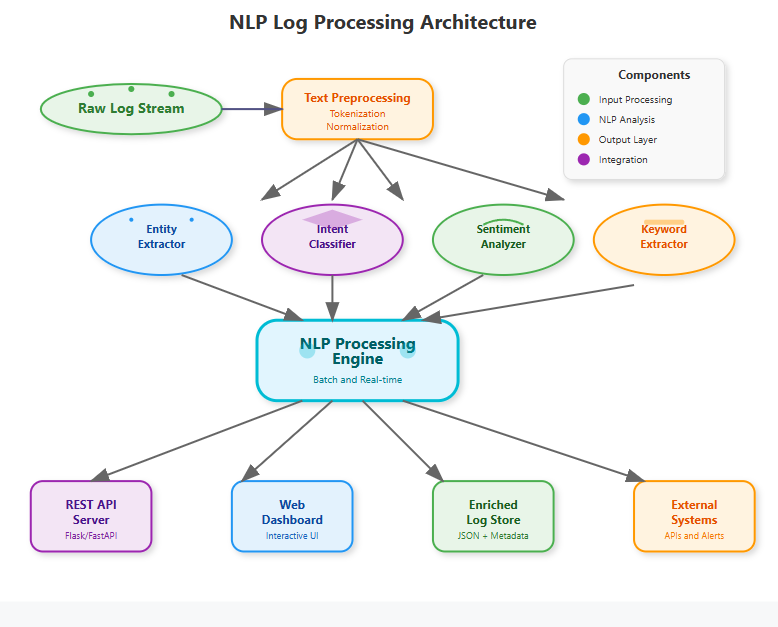
Core NLP Components for Log Processing
[

](https://substackcdn.com/image/fetch/\)s!3JLL!,fauto,qauto:good,flprogressive:steep/https%3A%2F%2Fsubstack-post-media.s3.amazonaws.com%2Fpublic%2Fimages%2Fba9de5ad-cfe4-4acc-89d1-f0d805656b1e_778x627.png)
Text Preprocessing Pipeline
Your logs arrive with timestamps, stack traces, and varying formats. The preprocessing pipeline normalizes this chaos into structured text ready for NLP analysis.
[Read more](https://sdcourse.substack.com/p/day-84-teaching-your-logs-to-speak)
Write a comment