Grokking Type-level Programming: Crafting Arithmetic in TypeScript without Digits and Operators

Grokking Type-level Programming: Crafting Arithmetic in TypeScript without Digits and Operators
### Grokking Type-Level Programming: Crafting Arithmetic in TypeScript without Digits and Operators
Photo by [Chris Liverani](Unsplash(https://unsplash.com?utmsource=medium&utmmedium=referral)
> You may have heard that the TypeScript typing system is [Turing complete](Conway’s Game of Life(2D games(DOOM(https://www.youtube.com/watch?v=0mCsluv5FXA) in TypeScript types)!
> In this article, I want to demonstrate the power of type-level programming in TypeScript, starting from the very basics. And what’s the beginning for us, the programmers? That’s right — numbers. I want to create the numeral system using only TypeScript types. By the end of this article, you’ll be able to manipulate numbers — even arrays of numbers — without using any digits or operators. Let’s get started!
### In the middle of nowhere
> “The journey of a thousand miles begins with one step.” — Lao Tzu
Every calculus or measurement system starts with zero. Zero is the neutral element for symmetric groups, where addition is a group operation in the group theory. Sorry, that got a bit nerdy. In short, we must define a zero for our type-level system to build everything else upon it.
type \_Zero = "🇺🇦";
Here are two key points about this code line:
1. Abstracting from digits. I intentionally haven't used a "0" character (or even a 0-digit as a type, which I could). To abstract entirely from any pre-existing numeric representation, I decided to use my country's flag as a symbolic stand-in (Доброго вечора!)
2. Underscore prefix. I will use underscores to differentiate the internal types in my arithmetic system. Later, when we discuss the system's I/O, I will explain the relationship between internal and external types.
### Numbers as a numeral system language
> “Numbers are the universal language offered by the deity to humans as confirmation of the truth.” — St. Augustine of Hippo
In our algebra, we will operate on a set of positive integer numbers limited by the maximum. We will stop at 5, which will be enough to demonstrate the power of the TypeScript type system.
You might suspect, till now, that if we haven't provided any contextual sense for a zero in our system and put the flag emoji in it, what should we do with other numbers? Digits, Roman numerals, or other symbology don't matter when interpreting numbers in Turing complete systems. Relations matter!

)
Having a zero in our domain-specific language, we can define the number as the next recursion type:
type \Number = \Zero | { prev: \_Number };
Every integer is the successor of the previous one, making this relationship crucial for future operations. Let's define the first generic, responsible for numbers relation
type \_Next = { prev: T };
And finally, the prominent citizens of our village — the numbers!
type \One = \Next<\_Zero>;
type \Two = \Next<\_One>;
type \Three = \Next<\_Two>;
type \Four = \Next<\_Three>;
type \Five = \Next<\_Four>;
type \Max = \Five;
Once again, we are responsible for defining the maximum value for our numeral system. Enforcing this limit will be helpful in future operations.
### User-Friendly I/O
> “Everything should be made as simple as possible, but not simpler.” — Albert Einstein
We are close to starting to create something computational. For now, we have defined the numeral system's "numbers" as TypeScript types.
Running ahead, I will not reveal a big secret if I say that the system's "functions" would be TypeScript generics. Generics take parameters like function arguments, and TypeScript’s type inference determines the return value.
However, using our already declared numeric types might be cumbersome because our users must always keep these definitions on hand. Fortunately, TypeScript provides literal types that we can consider as values of the numeral system. Let's imagine, for a while, how the function of adding would look in that case:
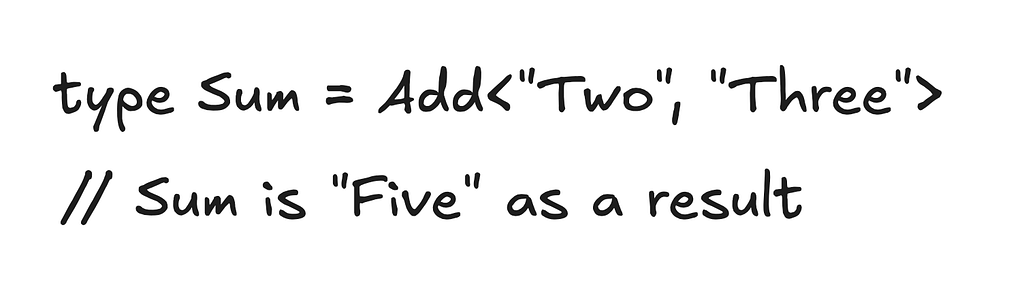
)
But we talked about the matter of predecessor-successor relations between types. How do literal types preserve it?
Let's consider previously defined numbers as internal types of our numeric system and literal types as external types. We will match them in a 1:1 relation—the user will provide literal-type arguments as input and receive the result in a literal-type view as output. However, the system will calculate the resulting type inferences based on internal types.
// The definition of "external" numbers
type \_StringNumber = "Zero" | "One" | "Two" | "Three" | "Four" | "Five";
// Here, we convert "internal" types to "external"
type \StringifyNumber = T extends \Zero ? "Zero"
: T extends \_One ? "One"
: T extends \_Two ? "Two"
: T extends \_Three ? "Three"
: T extends \_Four ? "Four"
: T extends \_Five ? "Five" : never;
// And vice versa, from "external" to "internal"
type \ParseNumber = T extends "Zero" ? \Zero
: T extends "One" ? \_One
: T extends "Two" ? \_Two
: T extends "Three" ? \_Three
: T extends "Four" ? \_Four
: T extends "Five" ? \_Five : never;
As you remember, I mentioned that types with underscore prefixes are considered internal types. It means that users of our type-level system will not use them for user calculations. Eventually, to demonstrate user-specific types, let's start with some warm-up.
### Increment: the first step into the world of Calculus
> “From a tiny spark may a great fire grow.” — Dante Alighieri
For computer science, the increment is the most fundamental and, simultaneously, the most trivial operation. Attentive readers may have noticed that we have already implemented it as a \_Next type. That will be right, but let's refine it to consider the upper limit of our algebra.
type \Increment = T extends \Max ? never : \_Next;
As you see, we infer all exceeded values of our computations to never.
Let’s integrate this mathematical function with our I/O system from the previous section:
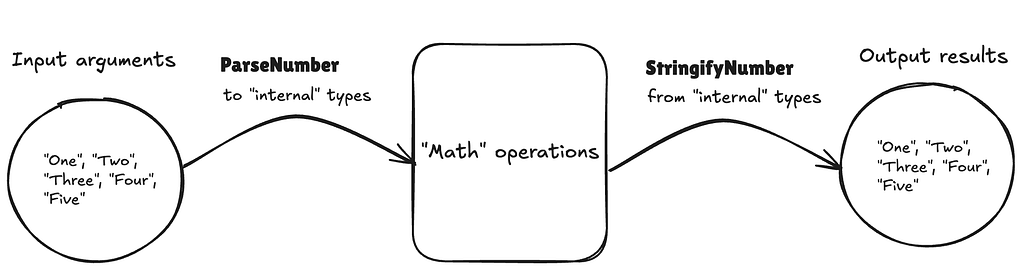
)
Referencing the schema above, we can introduce our first mathematical calculation crafted only on TypeScript types!
type Increment =
\StringifyNumber<\Increment<\_ParseNumber\>>;
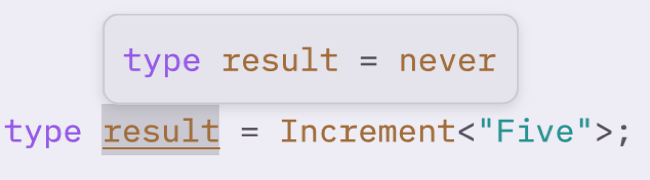
Let's see what we have in the final stage:
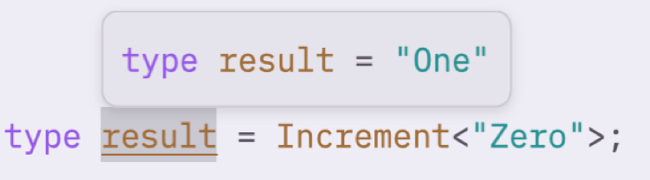
)
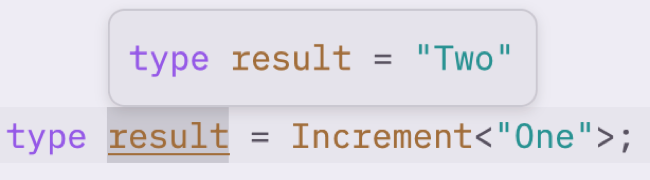
)
)
Voila! We have a complete mathematical operation in the world without digits!
### Addition without “+”
> “Mathematics is the art of giving the same name to different things.” — Henri Poincaré
Let's move forward and create the most popular operation of arithmetics: addition. Looking at the implementation of our I/O converters, we can assert that iteration is not a big friend of type-level programming. The idea of gradual iteration from the first number to the sum of the numbers is natural but hard to complete in type-level systems.
What if we contract to the iteration's antagonist — recursion? It turns out that's a key! We can interpret the addition as the following recursion formula:

)
Can we implement this in terms of our numeral system? Let's break a formula into some meaningful tokens and consider them:
Now, I propose you come to the start and recall what we define as the number of our numeral system:
type \Number = \Zero | { prev: \_Number };
Notice the subtle hint about subtracting one from a number?
Reference to the prev! The previous number is the result of subtraction by one. So, we need to create a function that takes a number as an argument and returns its previous number.
This may be a dangerous intention because our definition of numbers includes a zero, which doesn't have a reference to a previous value.
Let's look at the recursion formula of an addition once again. In the condition predicate, we check the parameter's equality to zero. We use b only in the conditional branch, where b can't be a zero. This means we can create a non-zero assertion and use it in our decremental function.
Okay, we dive deeply this time, so let's push off from the bottom and rise to the surface together!
At first, the non-zero assertion that "narrows" the type:
type \NonZero = T extends \Zero ? never : T;
Next, the single subtraction by a prev reference:
type \Prev = \NonZero\["prev"\];
And finally, ladies and gentlemen, the final form of addition!
type \_Add =
B extends \_Zero
? A
: A extends \_Max
? never
: \Add<\Next, \_Prev\>;
Wrapping it to the user-friendly I/O…
type Add **=
\StringifyNumber<\Add<\ParseNumber, \ParseNumber\>>;**
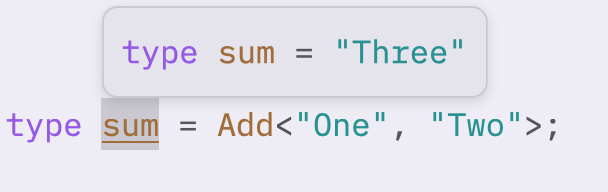
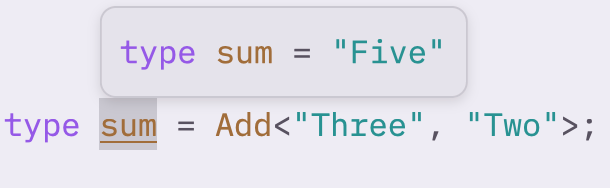
**And finally, we have the long-awaited result!**
********
****)
********
****)
****
)
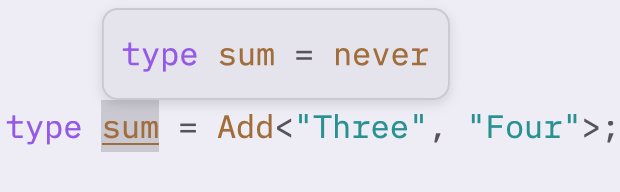
Oops! The result exceeded our algebraic maximum.
Write a comment